If you’ve ever wished there were a simple, visual way to manage your tasks—something that sits between your chaotic inbox and a full-blown project management suite—you might be looking for Trello. Built around the concept of digital boards and cards, Trello has become one of the most popular productivity tools for teams and individuals alike.
But what is Trello, really? And why do so many startups, agencies, and creative teams swear by it?
Let’s dive into what Trello does, who it’s for, and how it can transform the way you work—without overwhelming you in the process.
What Is Trello?
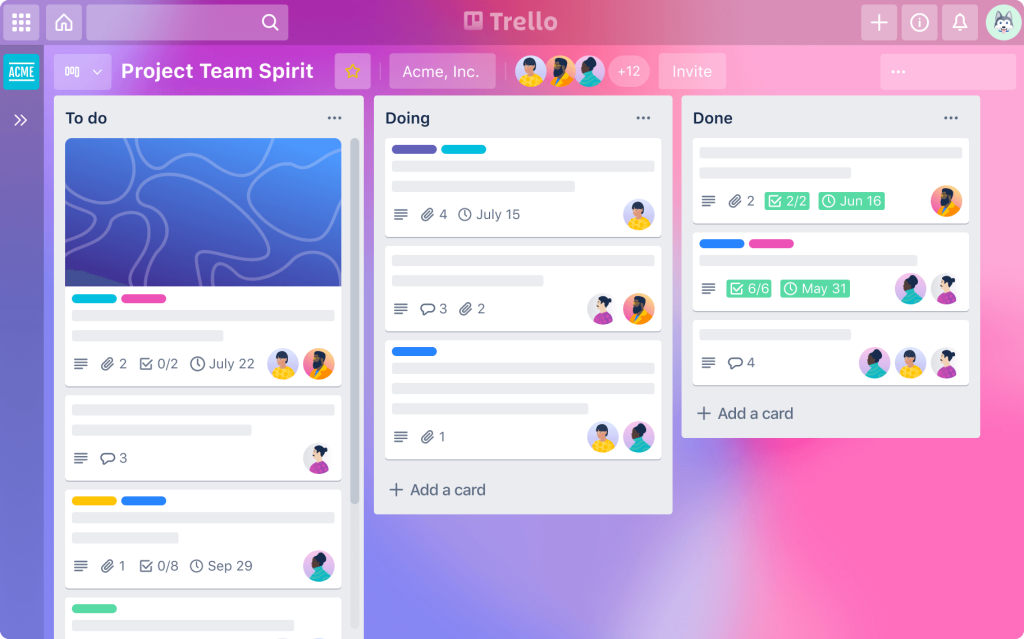
Trello is a visual collaboration and project management tool that lets you organize tasks using a simple yet powerful structure: boards, lists, and cards.
- Boards represent projects or workflows.
- Lists are stages of progress, such as “To Do,” “In Progress,” and “Done.”
- Cards are individual tasks that can move across lists as work progresses.
Imagine a corkboard filled with sticky notes that you can move around and annotate. Now imagine that corkboard is digital, accessible to your whole team, and equipped with powerful features like due dates, checklists, file attachments, and automation. That’s Trello.
Trello was originally developed by Fog Creek Software and later acquired by Atlassian, the company behind Jira and Confluence. But unlike those more technical tools, Trello is loved for its user-friendly approach. It doesn’t require training, IT setup, or complex configuration. You can sign up and get your first board running in less than 10 minutes.
What Makes Trello Great for Small Teams?
Small teams often juggle multiple roles and fast-changing priorities. That’s where Trello shines: it helps you stay aligned without slowing things down.
Here’s what makes Trello a good fit for startups, freelancers, nonprofits, and even classrooms:
- Ease of use: The drag-and-drop interface is intuitive—even for people who’ve never used a project management tool before.
- Visual clarity: At a glance, you can see who’s doing what, what’s in progress, and what’s falling behind.
- Collaboration: Tag teammates, leave comments, set deadlines, and share documents—all within a single card.
- Scalability: Whether you’re managing a personal to-do list or a team content calendar, Trello adapts to your needs.
- Affordability: Trello’s free plan is generous, and you can scale up with paid features only when you need them.
“Trello is one of the rare tools that works just as well for an individual as it does for a team. It grows with you.” – Independent design consultant, Trello user since 2019
Key Features of Trello (and Why They Matter)
Trello may look deceptively simple at first glance—but behind the colorful cards is a toolkit of smart features that help small teams manage big ideas.
🧩 Boards, Lists, and Cards
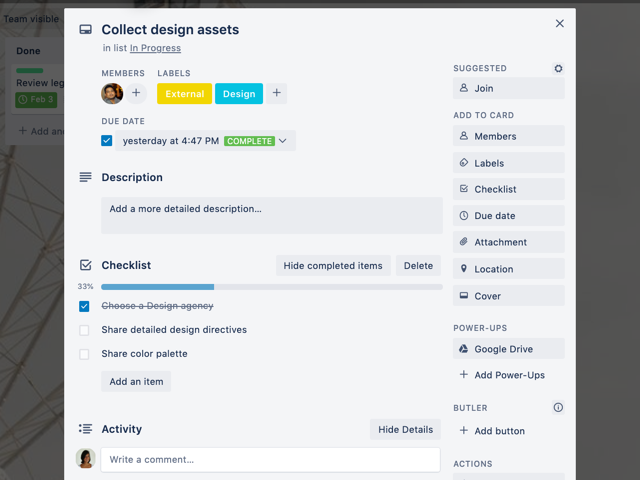
This is Trello’s core structure. A board is your workspace, lists define the steps or categories, and cards are the actual tasks. You can move cards between lists to show progress.
🏷️ Labels and Filters
Add color-coded labels for categories like “High Priority,” “Marketing,” or “Client Work.” Labels make it easy to sort and filter cards when your board gets crowded.
📅 Due Dates and Reminders
Each card can have a deadline, and Trello will notify you when it’s approaching. It helps everyone stay on schedule—without needing a separate calendar app.
✅ Checklists
Break tasks into smaller subtasks within a card. For example, a card titled “Launch Email Campaign” might have a checklist like:
- Write copy
- Design graphics
- Get approvals
- Schedule send
📂 Attachments and Comments
You can upload files directly to a card, link from Google Drive or Dropbox, and collaborate in context by leaving comments.
⚡ Power-Ups
Trello’s add-ons (called Power-Ups) extend its functionality. Want to view your board as a calendar? Connect to Slack? Track time? Add dependencies? There’s a Power-Up for that.
🤖 Automation with Butler
Trello includes a built-in automation tool called Butler that can do things like:
- Automatically assign tasks when cards are moved
- Send reminders for overdue tasks
- Sort lists every Monday
No coding required—just plain language rules like “When a card is moved to ‘Done’, mark the due date as complete.”
Use Cases: How People Actually Use Trello
Trello isn’t just for traditional project managers. It’s popular across a wide range of use cases:
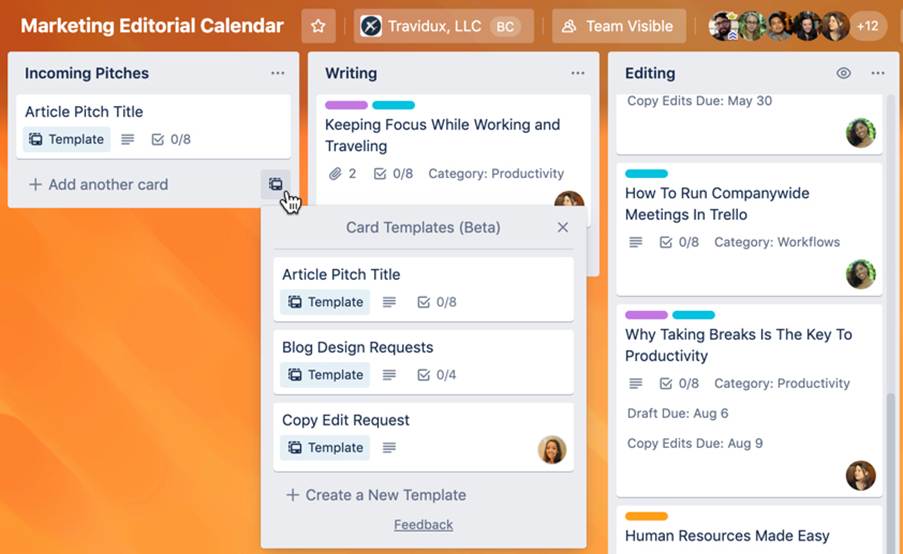
- Content creators use it to manage editorial calendars
- Startups track product development sprints
- HR teams organize onboarding processes
- Educators build lesson plans and class activities
- Event planners coordinate vendors, timelines, and logistics
Even outside of work, people use Trello for planning weddings, organizing vacations, and tracking personal goals.
Tip: One of the most productive ways to use Trello is to create a board template for recurring workflows. For example, a weekly meeting prep board or a monthly newsletter checklist. Just copy and reuse.
Things to Watch Out For
Trello is not without its limitations. While it excels in flexibility and ease, it may fall short for teams that need more structure or reporting. For example:
- It lacks native Gantt charts or timeline views (unless you use a Power-Up)
- Task dependencies and workload management are minimal compared to tools like Asana or ClickUp
- Boards can become cluttered if not maintained—archiving old cards regularly is a must
Still, for many small teams, these aren’t dealbreakers—they’re trade-offs for a tool that’s easy to adopt and a pleasure to use.
Is Trello Right for You?
If you’re looking for a straightforward way to organize tasks, collaborate with teammates, and get visibility into what’s going on—Trello is a fantastic starting point.
It’s especially powerful for:
- Teams who need flexibility and prefer visual thinking
- Users with little to no project management experience
- Freelancers and solopreneurs who want clarity without complexity
Trello won’t do the work for you—but it makes doing the work a lot easier.