Everything you need to know about the visual workspace that’s transforming how teams think, plan, and create together
What is Miro?
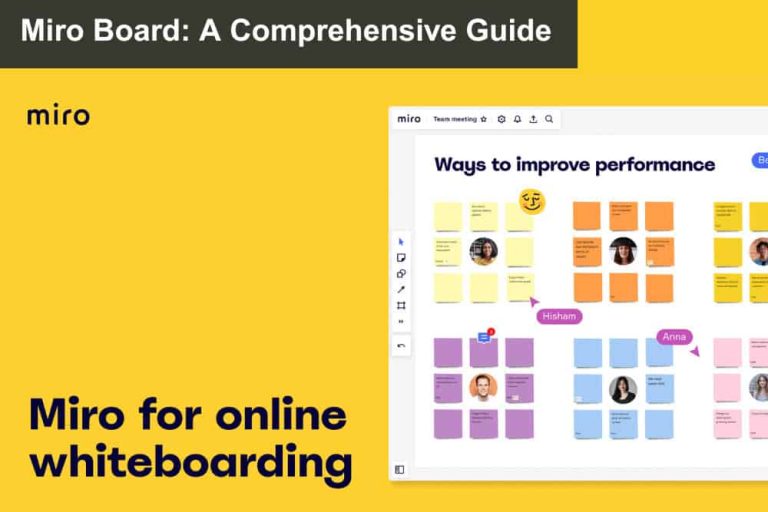
Miro is an online collaborative whiteboard platform that enables teams to work together in real-time on an infinite digital canvas. Think of it as a supercharged whiteboard that:
✅ Never runs out of space
✅ Never loses your work
✅ Can be accessed anywhere, anytime
✅ Supports unlimited team members
Originally launched in 2011, Miro now serves 50+ million users worldwide, from small startups to Fortune 500 companies.
🎯 Quick Stats
| Metric | Number |
|---|---|
| Users Worldwide | 50+ million |
| Available Templates | 300+ |
| Integrations | 100+ |
| Countries | 180+ |
| Enterprise Customers | 99% of Fortune 100 |
🚀 Core Features Overview
1. Infinite Canvas
Unlike physical whiteboards, Miro’s canvas expands infinitely in all directions.
Canvas Modes:
- 🔍 Fit to screen – See everything at once
- 🎯 Focus mode – Concentrate on specific sections
- 📊 Presentation mode – Walk through ideas step-by-step
- 🖥️ Full-screen mode – Minimize distractions
2. Real-Time Collaboration
See your team’s work happen live with these features:
| Feature | What It Does |
|---|---|
| Live Cursors | See where teammates are working |
| User Avatars | Know who’s online and active |
| Comments & Mentions | Communicate directly on boards |
| Video Chat Integration | Talk while working together |
3. Rich Content Toolkit
Basic Tools:
- 📝 Sticky notes (multiple colors & sizes)
- 🔷 Shapes and arrows for diagrams
- ✏️ Freehand drawing tools
- 📄 Formatted text boxes
Advanced Elements:
- 🖼️ Images and GIFs from built-in libraries
- 📎 Document uploads (PDFs, presentations, spreadsheets)
- 🎥 Embedded videos and links
- 🔧 Interactive prototypes and wireframes
4. Template Library (300+ Options)
| Category | Popular Templates | Best For |
|---|---|---|
| 🧠 Brainstorming | Mind maps, Idea parking lots, Crazy 8s | Generating new ideas |
| ⚡ Agile & Scrum | Sprint planning, Retrospectives, Standups | Software development |
| 🎨 Design Thinking | Customer journeys, Personas, Empathy maps | User experience |
| 📈 Strategy | SWOT analysis, Business model canvas, OKRs | Business planning |
| 📋 Project Management | Gantt charts, Kanban boards, Timelines | Project coordination |
5. Smart Features
✨ Sticky Note Clustering – Automatically groups related ideas
✨ Smart Drawing – Converts sketches into clean shapes
✨ Voting Tools – Built-in dot voting and ranking
✨ Timer Functions – Keeps sessions focused
✨ Auto-Sync – Saves work across all devices
🔗 Integration Ecosystem
Video Conferencing
| Platform | Integration Features |
|---|---|
| Zoom | Start Miro directly from meetings |
| Microsoft Teams | Embed boards in channels |
| Google Meet | Share boards during calls |
Project Management
- Jira → Convert sticky notes to tickets
- Asana → Sync tasks and timelines
- Trello → Export boards to cards
Design & Development
- Figma → Import designs for review
- Sketch → Sync design files
- GitHub → Link code repositories
Communication
- Slack → Share boards and notifications
- Microsoft Office → Import/export documents
- Google Workspace → Seamless file sharing
💰 Pricing Plans
| Plan | Price | Best For | Key Features |
|---|---|---|---|
| Free | $0 | Getting started | • 3 editable boards<br>• Unlimited team members<br>• 100+ templates |
| Starter | $8/user/month | Small teams | • Unlimited boards<br>• All integrations<br>• Advanced templates |
| Business | $16/user/month | Growing teams | • Advanced security<br>• SSO integration<br>• Private sharing |
| Enterprise | Custom | Large organizations | • Enterprise security<br>• Admin controls<br>• Dedicated support |
🎯 Who Should Use Miro?
✅ Perfect For:
- Remote & hybrid teams needing visual collaboration
- Design & product teams building user experiences
- Consultants & facilitators leading workshops
- Educators & trainers creating interactive lessons
- Project managers planning and tracking work
❌ Not Ideal For:
- Teams only needing basic text communication
- Organizations with strict data residency requirements
- Users uncomfortable with digital tools
- Projects requiring advanced CAD/technical drawing
🚀 Getting Started: 5 Simple Steps
Step 1: Sign Up (2 minutes)
- Go to miro.com and create free account
- No credit card required
- Instant access to all basic features
Step 2: Choose Your First Template (1 minute)
Recommended starter templates:
- 🧠 Brainstorming – For idea generation
- 📋 Team Retrospective – For team reflection
- 📊 Project Planning – For organizing work
Step 3: Invite Your Team (30 seconds)
- Share via email, link, or Slack
- Team members can join without accounts
- Start collaborating immediately
Step 4: Add Your First Content (5 minutes)
- Click “Sticky Note” tool
- Type your idea
- Drag to organize
- Add more notes and connect with arrows
Step 5: Explore Advanced Features
- Try voting on ideas
- Use timer for focused sessions
- Add images and drawings
- Experiment with templates
📈 Common Use Cases & Templates
🧠 Brainstorming Sessions
Goal: Generate and organize ideas quickly
Process:
- Use “Brainstorming” template
- Set 5-minute timer for idea generation
- Add sticky notes rapidly
- Group similar ideas together
- Vote on top concepts
📋 Project Planning
Goal: Visualize project timeline and responsibilities
Process:
- Start with “Project Planning” template
- Break project into phases
- Assign team members to tasks
- Set deadlines and dependencies
- Track progress with status updates
🎨 Design Reviews
Goal: Gather feedback on designs collaboratively
Process:
- Upload design files to board
- Team adds comments and sticky notes
- Use voting to prioritize feedback
- Create action items for iterations
- Version control with board history
📊 Strategic Planning
Goal: Develop business strategy using proven frameworks
Popular frameworks:
- SWOT Analysis – Strengths, Weaknesses, Opportunities, Threats
- Business Model Canvas – 9-block business model overview
- OKR Planning – Objectives and Key Results setting
💡 Pro Tips for Success
🎯 Start Simple
- Begin with sticky notes and basic shapes
- Gradually explore advanced features
- Don’t overwhelm team with too many tools initially
📏 Establish Guidelines
- Create color coding system (e.g., red = urgent, blue = ideas)
- Use consistent shapes for similar concepts
- Agree on board organization standards
📚 Leverage Templates
- Always start with existing templates
- Customize templates for your team’s needs
- Save custom templates for future use
👥 Facilitate Actively
- Assign session facilitator
- Use timers to maintain energy
- Ensure everyone participates
- Summarize key decisions
🔄 Keep Boards Alive
- Update boards after sessions
- Archive completed items
- Reference boards in future meetings
- Export key insights to other tools
⚠️ Common Pitfalls to Avoid
| Problem | Solution |
|---|---|
| Overwhelming new users | Start with simple brainstorming template |
| Cluttered boards | Establish organization standards early |
| Low participation | Use facilitation techniques and timers |
| Forgetting follow-up | Export action items to project tools |
| Feature overload | Focus on 2-3 core features initially |
🏆 Success Metrics to Track
Team Adoption
- Board creation rate – Are teams actively using Miro?
- Collaboration frequency – How often do teams work together?
- Template usage – Are structured approaches being adopted?
Productivity Impact
- Meeting efficiency – Are sessions more focused and productive?
- Decision speed – Are teams reaching conclusions faster?
- Idea quality – Are better solutions being generated?
Business Outcomes
- Project delivery – Are timelines being met more consistently?
- Team satisfaction – Do team members enjoy collaborating more?
- Innovation rate – Are more creative solutions emerging?
🎉 Ready to Start?
Miro transforms abstract thinking into visual reality, making collaboration more engaging, productive, and inclusive. The platform’s strength lies in changing team dynamics by making everyone’s thinking visible and allowing simultaneous contribution.
Your Next Steps:
- Sign up for free account at miro.com
- Choose a brainstorming template
- Invite 2-3 team members
- Run your first 15-minute session
- Explore advanced features gradually
Remember: Your first breakthrough idea might be just one sticky note away! 🚀
📞 Need Help Getting Started?
- 📚 Help Center – Comprehensive guides and tutorials
- 🎥 Video Library – Step-by-step feature walkthroughs
- 👥 Community Forum – Connect with other Miro users
- 💬 Live Chat – Real-time support for paid plans