Project management often starts with a to-do list—and quickly spirals into email threads, deadline confusion, and missed handoffs. That’s where Asana steps in.
More than just a task tracker, Asana is a full-featured project management platform designed to help teams plan, coordinate, and execute work with clarity. It offers structure, flexibility, and a surprisingly clean interface—making it a favorite for businesses that need more than sticky notes but less than a corporate ERP system.
Whether you’re managing a remote team, running a creative agency, or trying to bring order to startup chaos, Asana gives you the tools to see the big picture and the small details—without having to micromanage either.
What Is Asana?
Asana is a cloud-based project and task management software that helps individuals and teams plan, organize, and track work. Launched in 2011 by Facebook co-founder Dustin Moskovitz and engineer Justin Rosenstein, Asana was built with one purpose: eliminate the need for work about work.
At its core, Asana breaks down your work into Projects, Tasks, and Subtasks. Each task can include assignees, deadlines, files, dependencies, and comments. It all lives in a flexible workspace that lets you view your work in multiple ways—like lists, boards, calendars, and Gantt-style timelines.
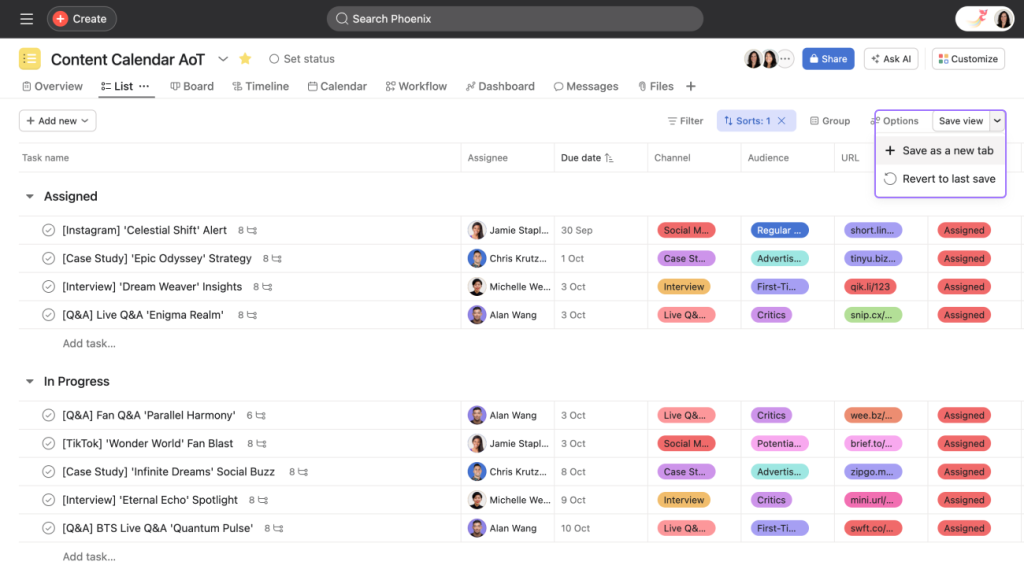
Unlike lighter tools like Trello, Asana adds a layer of structure. It’s perfect for teams that manage interconnected projects, require approval flows, or need to keep multiple stakeholders aligned—without endless meetings or update emails.
What Makes Asana Stand Out?
One of Asana’s greatest strengths is its versatility. It works well across departments—whether you’re managing marketing campaigns, product development, operations, or even HR onboarding.
Here’s what users love about Asana:
- Multiple project views: Use List View for straightforward task tracking, Kanban Boards for workflow management, Timeline View for project planning, and Calendar View for deadline visibility.
- Task dependencies: Set up relationships between tasks—ensuring one cannot begin before the other is finished.
- Automation: Asana’s built-in automation lets you create rules like “when a task is marked complete, assign the next task.”
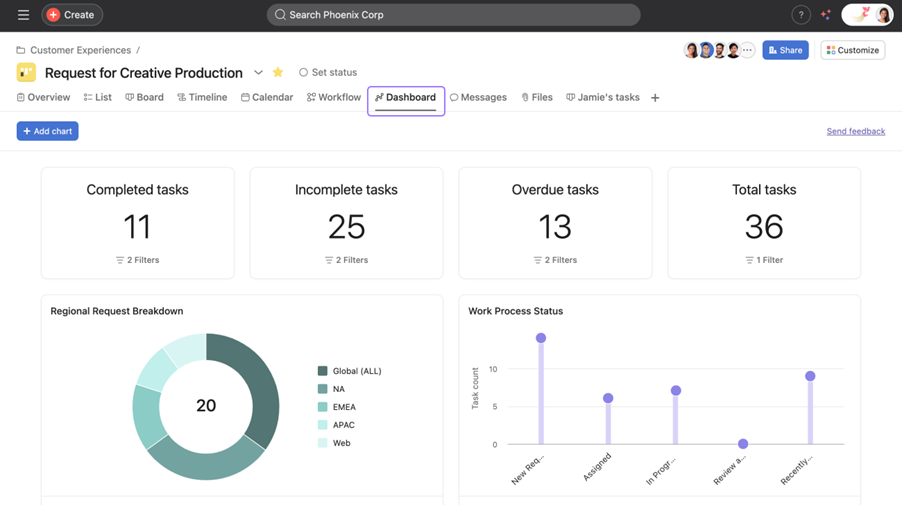
- Team alignment: Features like project status updates, goal tracking, and real-time notifications help keep everyone informed and on the same page.
- Templates: Kickstart your projects with pre-built templates for marketing plans, sprint cycles, product launches, and more.
“Asana replaced three tools in our stack. It helped us consolidate task management, planning, and reporting in one clean system.” — Startup founder, user since 2020
Key Features of Asana: What You Get and How It Helps
Let’s take a closer look at the building blocks of Asana and how they come together to improve team productivity.
📋 Tasks, Projects & Portfolios
Tasks live inside projects, and projects can be grouped into Portfolios (ideal for high-level overviews). This hierarchy is what gives Asana its strength in handling complex operations.
👁️ Multiple Views
Switch between different project views based on how your team works:
- List View: Great for to-do style breakdowns.
- Board View: Ideal for Kanban-style task progression.
- Calendar View: Helpful for deadline-driven teams.
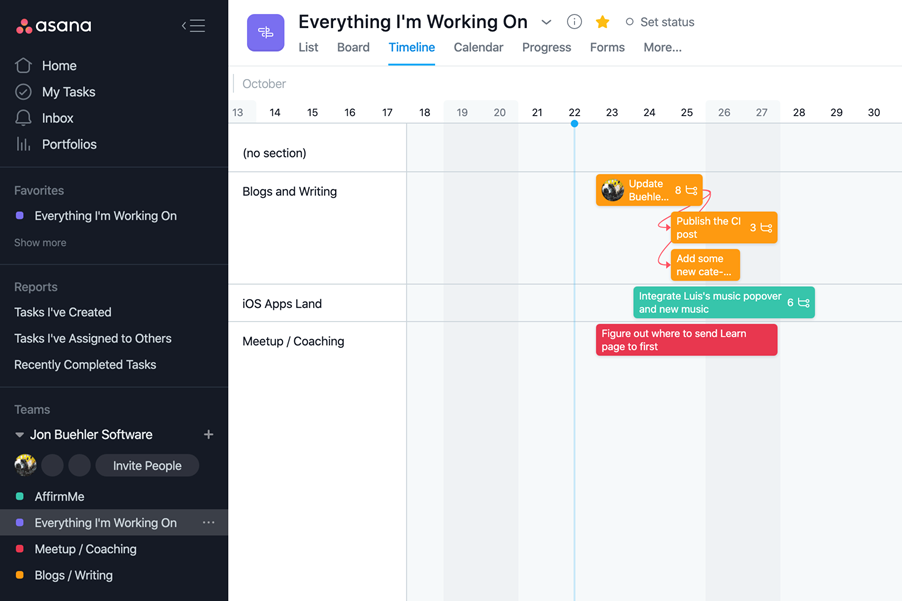
- Timeline View: A Gantt-style planner to visualize project milestones and dependencies.
📌 Custom Fields
Track anything—priority level, budget status, region—by creating custom fields in your tasks. These fields can be used to filter or sort tasks, making it easy to manage large projects.
🔄 Automations
Use “Rules” to create automated workflows: for example, when a task is moved to “Done,” notify a stakeholder or assign a follow-up task.
🔗 Integrations
Asana integrates with over 200 popular tools—Google Workspace, Microsoft Teams, Slack, Zoom, Zapier, Notion, Figma, and more. It plays well in just about any digital stack.
Use Cases: Where Asana Really Excels
While Asana is flexible enough for personal productivity, its real power shines in team settings. Common use cases include:
- Marketing teams managing content calendars, product launches, and creative approvals
- Product teams coordinating sprints, feature releases, and bug tracking
- Operations teams streamlining internal processes and documentation
- Client-facing teams tracking deliverables, feedback, and status reports
Tip: Try using Asana Goals to tie projects back to broader objectives. It helps teams stay aligned on impact, not just outputs.
Pros and Cons of Asana
✅ Pros
- Intuitive and clean UI, even with powerful features
- Flexible for both structured and agile teams
- Real-time collaboration and updates
- Strong mobile app experience
- Scales well from small startups to enterprise needs
❌ Cons
- Can feel overwhelming at first if you’re used to simpler tools
- Most powerful features (like Timeline and Goals) are behind a paywall
- Limited offline functionality
- Too structured for very lightweight or personal workflows
Still, for most small to mid-sized teams, the pros far outweigh the cons—especially if your projects require multiple steps, people, and deadlines.
Is Asana Right for You?
Asana is ideal for teams who want to move beyond basic task tracking and need a more structured, multi-layered view of their work. It works best for:
- Growing teams juggling multiple projects
- Cross-functional departments that need visibility and coordination
- Managers who want to keep an eye on progress without micromanaging
- Anyone who’s tired of endless update emails and status meetings
If you’re a freelancer or a solo operator, Asana might feel like overkill—but for most collaborative teams, it’s a game changer.
Final Thoughts: Structure Without the Stress
Asana does more than just keep tasks organized—it helps teams stay focused, informed, and accountable. It brings transparency into complex projects, without requiring a steep learning curve.
If Trello is like a bulletin board for your tasks, Asana is more like a digital project manager—one who’s clear, calm, and always keeping an eye on what’s next.
Whether you’re launching a product, planning an event, or aligning your team around quarterly goals, Asana gives you the structure to succeed—without getting in your way.