Picture this: It’s 11:47 PM on a Thursday, your biggest client just requested “a few tiny tweaks” to their campaign launching Monday morning, and your lead designer is stuck in traffic with the only copy of the working file on their laptop. Meanwhile, the account manager is fielding panicked texts, the copywriter needs to see the layout changes, and the client is refreshing their email waiting for updates.
If this scenario sounds familiar, you’re living the pre-Figma agency nightmare that nearly broke our creative team. Six months ago, this was our reality. Today? That same client revision gets handled in real-time, with the entire team collaborating seamlessly while the designer sits in that same traffic jam, making updates from their phone.
Welcome to the agency revolution that’s changing everything.
THE AGENCY PAIN POINT FIGMA ACTUALLY SOLVED
Let’s be honest—agencies have unique chaos that typical design articles don’t address. We’re not building one product with a dedicated team. We’re spinning 15 plates simultaneously, each representing a different client with different brand guidelines, different stakeholders, and different levels of “urgent” requests.
Traditional design workflows weren’t built for this reality. Sketch files lived on individual computers. Adobe Creative Suite required expensive licenses for every freelancer. Version control meant file names like “ClientLogo_Final_FINAL_UseThisOne_v47.psd.” Client feedback arrived via email screenshots with helpful annotations like “make it pop more.”
Figma didn’t just improve our design process—it saved our sanity.
Real-Time Client Collaboration That Actually Works
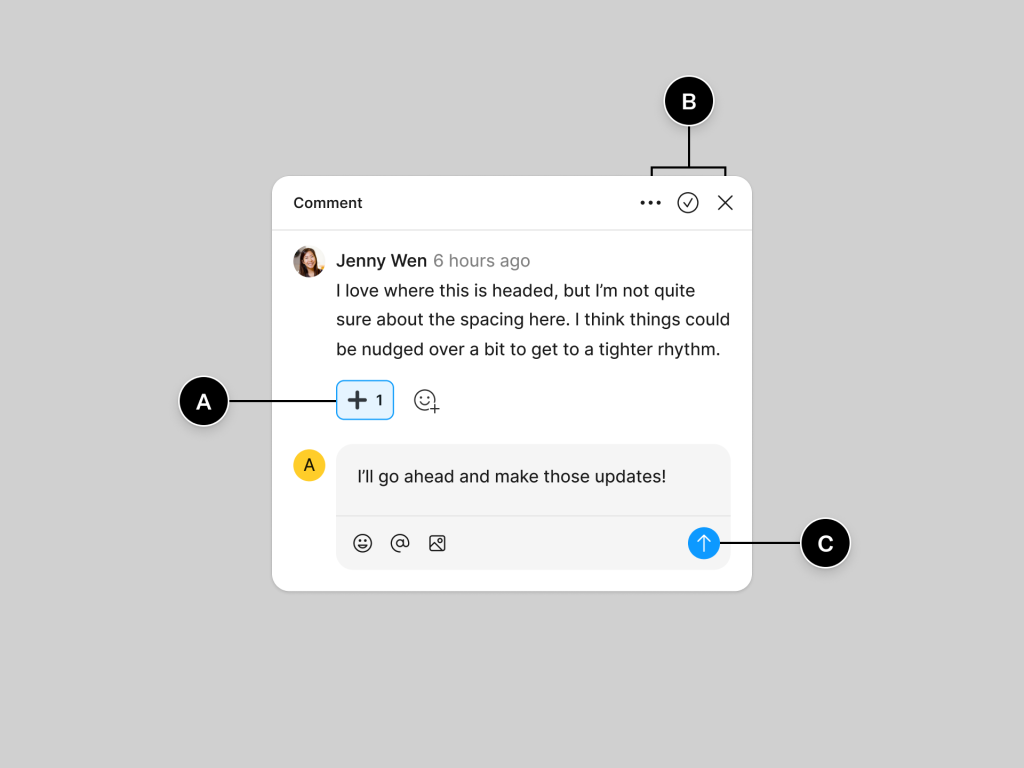
The game-changer? Clients can now see work in progress without us sending a single file. Share a Figma link, and suddenly Mrs. Henderson from the bakery chain can leave comments directly on her menu design instead of printing it out, writing notes in red pen, and scanning it back to us.
What This Means for Agency Life:
- No more email ping-pong with attached screenshots
- Clients see progress in real-time, reducing anxiety and check-in calls
- Feedback happens in context, not through interpretive dance over phone calls
- Approval cycles shrink from weeks to days
JUGGLING MULTIPLE CLIENTS: THE FIGMA ADVANTAGE
Team Libraries That Scale Across Brands
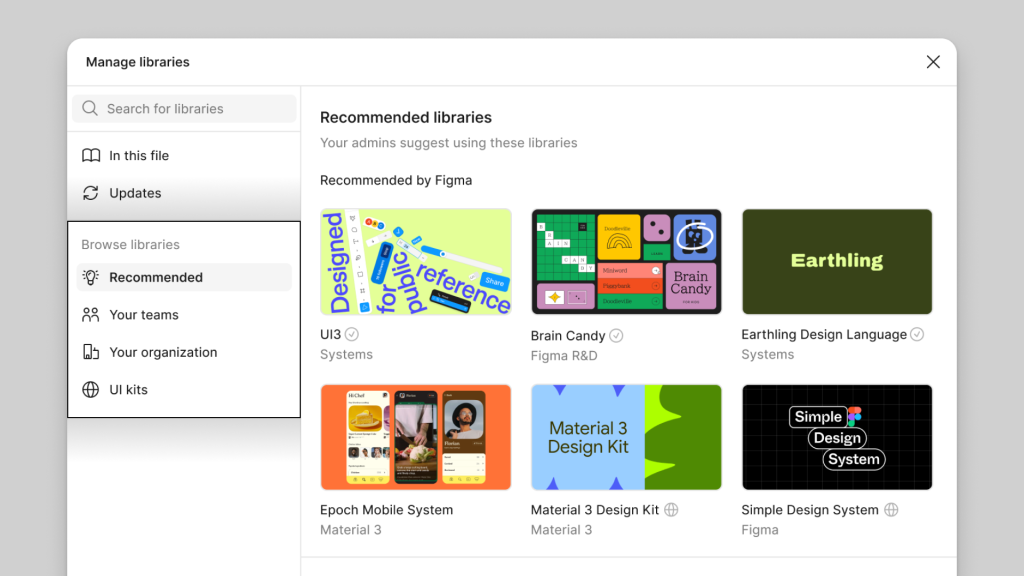
Managing brand consistency across multiple clients used to be a nightmare. Each brand had its own color palette, typography, logo variations, and component library scattered across various files and folders. Figma’s team libraries changed everything.
Now we maintain separate team libraries for each major client, ensuring brand consistency across every touchpoint. Need the approved shade of blue for Client A’s social media campaign? It’s right there in their brand library. Logo variations? All properly sized and formatted. Typography scales? Perfectly defined.
Our Team Library Structure:
- Client-specific libraries for major accounts
- Agency master library for common elements
- Template libraries for recurring campaign types
- Asset libraries for photography and illustration styles
Project Organization That Makes Sense
Before Figma, our project organization looked like a digital hurricane hit a filing cabinet. Now, everything lives in the cloud with intelligent organization:
By Client: Each client gets their own team space with projects organized by campaign type By Campaign: Individual projects for each campaign, from concepting to final delivery By Asset Type: Templates, brand guidelines, and reusable components all properly categorized
The result? New team members can find any client asset in under 30 seconds, and our senior designers stop getting interrupted every five minutes with “Where’s the logo file?” questions.
THE CREATIVE WORKFLOW TRANSFORMATION
From Concept to Campaign in Record Time
Our typical campaign development used to follow this painful process:
- Concepting in various disconnected tools
- Design creation in isolation
- Internal reviews via email and meetings
- Client presentation through static PDFs
- Revision rounds that felt like archaeological digs
- Final delivery in formats the client couldn’t open
Figma collapsed this entire workflow into a single, collaborative environment.
New Workflow Reality:
- Concepting happens live with the entire creative team
- Designs evolve in real-time with instant feedback loops
- Stakeholders participate without learning design software
- Prototypes communicate complex interactions clearly
- Handoff to production includes exact specifications
- Version control prevents the “wrong file” disasters
Prototyping That Sells Ideas
Static mockups don’t sell campaigns—experiences do. Figma’s prototyping capabilities let us show clients exactly how their digital campaigns will feel, not just look.
Game-Changing Prototype Applications:
- Website user flows that demonstrate the customer journey
- App interface concepts with realistic interactions
- Email campaign sequences showing the complete user experience
- Social media campaign flows demonstrating cross-platform consistency
- Interactive presentations that wow clients and win pitches
CLIENT MANAGEMENT BREAKTHROUGHS
The End of “Can You Make It Pop More?”
We’ve all been there—client feedback that’s about as helpful as a chocolate teapot. Figma’s commenting system transformed how clients communicate their needs:
Before: “The logo feels too small, and maybe the blue should be more blue-ish?” After: Comment pinned directly to logo saying “Increase size by 20%” with visual examples
Comment Categories We Use:
- 🔴 Critical Changes – Must-fix items before launch
- 🟡 Suggestions – Nice-to-have improvements
- 🟢 Approved – Elements that are finalized
- 🔵 Questions – Items needing clarification
Stakeholder Alignment Magic
Large client accounts often involve multiple stakeholders with conflicting opinions. Figma’s collaboration features help us manage these complex approval processes:
Multi-Stakeholder Workflow:
- Department heads review and comment separately
- Conflicts get resolved in real-time discussions
- Final approvers see consolidated feedback
- Decision makers can compare options side-by-side
- Sign-off happens with clear change documentation
THE BUSINESS IMPACT: NUMBERS THAT MATTER
Six months after full Figma adoption, our agency metrics tell a compelling story:
Efficiency Gains:
- 40% reduction in revision rounds per project
- 60% faster client approval cycles
- 25% increase in project capacity without additional hires
- 80% reduction in “lost file” emergency situations
Client Satisfaction Improvements:
- Net Promoter Score increased from 7.2 to 9.1
- Client retention rate improved by 30%
- Referral business increased by 45%
- Timeline adherence improved from 70% to 95%
Financial Impact:
- Reduced software costs by consolidating design tools
- Increased billable hours through improved efficiency
- Won larger projects due to improved presentation capabilities
- Decreased overtime costs through better collaboration
OVERCOMING AGENCY-SPECIFIC CHALLENGES
The Freelancer Integration Problem
Agencies live and die by freelance talent, but traditional design tools made freelancer integration expensive and complicated. Figma’s free viewer access changed everything.
Freelancer Onboarding Process:
- Send Figma project link (no software installation required)
- Provide brand library access for consistency
- Set up commenting permissions for client interaction
- Enable edit access for active project work
- Remove access when project completes
Result? Freelancers become productive immediately, and we’re not buying expensive software licenses for short-term contributors.
Security and Client Confidentiality
Agency work often involves unreleased products, confidential strategies, and sensitive brand information. Figma’s enterprise features address these concerns:
Security Measures We Implement:
- Project-specific permissions limiting access to need-to-know basis
- Client-dedicated team spaces preventing cross-contamination
- Version control with detailed change tracking
- Export controls preventing unauthorized downloads
- SSO integration with our agency’s security protocols
TRAINING THE TEAM: LESSONS LEARNED
The Adoption Strategy That Worked
Rolling out new software across a creative team requires finesse. Here’s what worked for us:
Week 1: Champions First
- Train 2-3 design leads extensively
- Let them evangelize benefits to the team
- Address concerns before they spread
Week 2: Pilot Projects
- Choose low-stakes projects for initial testing
- Pair Figma advocates with skeptical team members
- Document wins and improvements
Week 3: Full Migration
- Move all new projects to Figma
- Maintain legacy tool access for ongoing work
- Provide intensive support during transition
Week 4: Optimization
- Refine workflows based on real usage
- Create agency-specific templates and libraries
- Establish best practices documentation
Resistance Points and Solutions
“It’s too different from what I know” Solution: Paired learning with Figma-comfortable teammates
“Browser-based feels unstable” Solution: Demonstrated auto-save and offline capabilities
“Clients will be confused” Solution: Started with internal-only usage, gradually introduced client collaboration
“It’s another monthly expense” Solution: Showed cost savings from reduced software licensing and improved efficiency
THE COMPETITIVE ADVANTAGE
Winning Pitches with Better Presentations
Figma prototypes have become our secret weapon in new business pitches. Instead of showing static mockups and asking prospects to “imagine how this would work,” we demonstrate actual user experiences.
Pitch Improvements:
- Interactive demos that prospects can navigate themselves
- Real-time customization during pitch meetings
- Mobile-responsive previews showing cross-device experiences
- Collaborative sketching that includes prospects in the creative process
Faster Turnaround Times
In agency world, speed often wins accounts. Figma’s collaborative features let us deliver concepts and revisions faster than competitors still using traditional workflows.
Speed Advantages:
- Same-day concepts for urgent client requests
- Real-time revisions during client calls
- Instant handoff to production teams
- Rapid A/B testing of campaign variations
LOOKING AHEAD: THE AGENCY OF THE FUTURE
Figma isn’t just changing how we design—it’s changing how agencies operate. The platform enables new service offerings and client relationships that weren’t possible with traditional tools.
Emerging Opportunities:
- Collaborative brand development with clients as active participants
- Real-time campaign optimization based on performance data
- Cross-agency collaboration on complex, multi-vendor campaigns
- Client self-service for minor updates and seasonal campaigns
THE BOTTOM LINE FOR AGENCIES
If you’re running a marketing agency and not using Figma, you’re fighting with one hand tied behind your back. The platform doesn’t just improve design workflows—it transforms client relationships, team dynamics, and business operations.
The Investment Reality:
- Setup time: 2-4 weeks for full team adoption
- Learning curve: Gentle for designers, minimal for non-designers
- ROI timeline: Most agencies see benefits within 30 days
- Long-term impact: Fundamental improvement in agency operations
The question isn’t whether Figma is worth it for agencies—it’s whether you can afford to keep operating without it. In a business where client satisfaction, speed, and collaboration determine success, Figma isn’t just a design tool; it’s a competitive necessity.
Your clients are waiting. Your team is struggling with outdated workflows. Your competitors might already be using it.
The agency revolution is here, and it’s time to join it.
AGENCY QUICK SPECS
- Best For: Marketing agencies, design studios, creative teams
- Client Collaboration: Unlimited viewers, real-time comments, approval workflows
- Team Size: Scales from 3-person boutiques to 100+ person agencies
- Learning Curve: 1-2 weeks for full team productivity
- ROI Timeline: 30-60 days for measurable efficiency gains
- Bottom Line: The agency tool that finally makes collaboration feel effortless
★★★★★ 4.9/5 STARS
The design tool that transforms agencies from chaotic to client-focused.