Let’s be honest; everyone is busy, and most of us have a never-ending, constantly growing list of tasks we’d love to tackle, but rarely get through. Maybe you’ve heard about time blocking from productivity gurus or that one super-organized colleague who somehow gets everything done without breaking a sweat. I decided to put this time management method to the test with a dedicated 90-day experiment.
Here’s what I learned, the mistakes I made, and whether time blocking actually lives up to the hype.
Why I Started Time Blocking
Before my experiment, my workdays felt like I was playing productivity whack-a-mole. I’d start the morning with good intentions, then get pulled into reactive work—emails, surprise meetings, “quick questions” that turned into hour-long discussions. By 5 PM, I’d look at my to-do list and realize I’d barely made a dent in the important stuff.
Time blocking has generated a lot of buzz over the past few years – and people swear by it because it’s actually been proven to boost productivity up to 80%. With stats like that, I figured it was worth a serious try.
The plan was simple: for 90 days, I would schedule dedicated blocks of time for every task, from deep work sessions to email processing to creative projects. No more “I’ll just squeeze this in somewhere” mentality.
Week 1-2: The Learning Curve (and Reality Check)
The first two weeks were… rough. I was overly ambitious, scheduling back-to-back blocks with zero buffer time. When my first meeting ran long, it created a domino effect that derailed my entire day. I also underestimated how long tasks would actually take – what I thought was a 30-minute email session consistently stretched to 45 minutes.
Key lesson: Buffer time and flexibility are key. If an urgent task arises, assess its true urgency. If it must be done immediately, use your buffer time or decide which scheduled block can be postponed or shortened.
Week 3-6: Finding My Rhythm
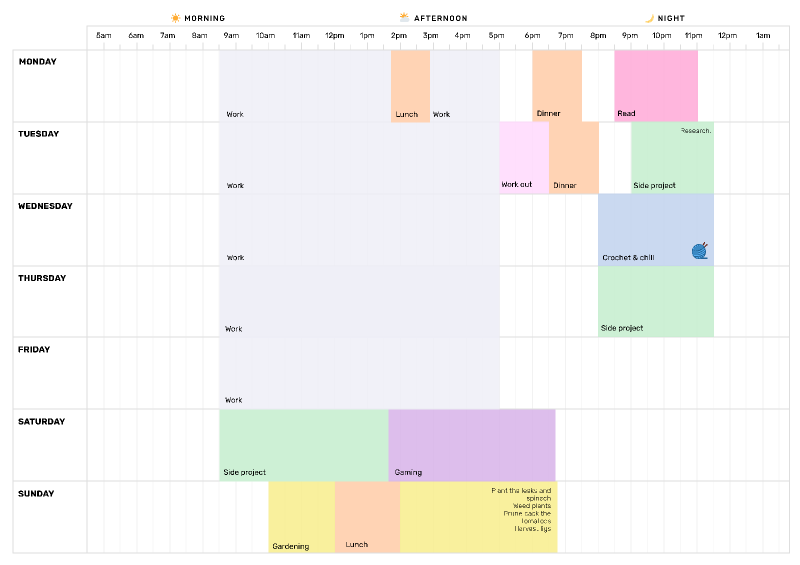
By week three, I started building in 15-minute buffers between blocks and became more realistic about time estimates. I also discovered my natural energy patterns. Turns out, I’m useless for creative work after 3 PM, but perfect for administrative tasks.
This is when I started seeing real benefits:
- Better focus: Focusing on one task at a time reduces context switching and distractions, which can actually end up wasting 6 hours/day.
- Reduced decision fatigue: Instead of constantly wondering “what should I work on next?”, my calendar told me exactly where to focus.
- Improved work-life balance: By scheduling personal time (yes, even lunch!), I stopped working late as often.
Week 7-12: The Real Test
The middle phase tested my commitment. There were days when urgent projects threatened to blow up my carefully planned schedule. The temptation to abandon time blocking was real.
But here’s what I learned: Cal Newport edits his plans throughout the day by crossing out original time blocks and filling them with updated plans as circumstances demand. The key isn’t rigid adherence—it’s maintaining intentionality about how you spend your time.
I started treating my time blocks like a chess game, moving pieces around as needed but always with strategic purpose.
The Final Stretch: Weeks 10-12
The last few weeks felt almost automatic. Time blocking had become a habit rather than a chore. I was consistently finishing my most important work, had better boundaries around interruptions, and felt more in control of my days.
The Results: What Actually Changed
After 90 days of dedicated time blocking, here’s what improved:
Productivity gains:
- Completed 40% more deep work projects compared to the previous quarter
- Reduced email processing time from scattered throughout the day to two focused 20-minute sessions
- Prevented multitasking and interruptions from dictating my day
Work-life balance improvements:
- Stopped checking emails after 6 PM (because I knew exactly when I’d process them the next day)
- Actually took lunch breaks instead of eating at my desk
- Left work on time 80% more often
Stress reduction:
- Less decision fatigue throughout the day
- Fewer missed deadlines because I could see capacity constraints in advance
- Better sleep because I wasn’t mentally rehearsing tomorrow’s chaos
What Didn’t Work (And How I Fixed It)
Not everything was smooth sailing. Here are the mistakes I made and lessons learned:
- Mistake #1: Over-scheduling Initially, I packed my calendar too tightly. Overscheduling your leisure time can be a self-defeating exercise. Scheduling activities, even if they’re for fun, can dampen their overall enjoyment.
Fix: I started scheduling only 6-7 hours of focused work per day, leaving space for the unexpected. - Mistake #2: Ignoring my energy cycles I was scheduling creative work in the afternoon when my brain was already fried.
Fix: To get the best results from time blocking, you need to align your work with your working patterns. I moved all creative work to my peak hours (9 AM – 12 PM). - Mistake #3: Not batching similar tasks I was switching between different types of work too frequently.
Fix: Task batching is an element of time blocking. When you batch tasks, you collect and connect any similar tasks so you can work on them at once.
The Tools That Made a Difference
While you can absolutely time block with pen and paper, digital tools made a huge difference:
- Digital calendar: I used Google Calendar with color-coded blocks for different types of work
- Time tracking: Apps like Toggl helped me get realistic about task durations
- Automated scheduling: Reclaim.ai: Free AI calendar app designed for visually scheduling time blocks at the best time around your existing events, while keeping your schedule flexible for priority changes.
Should You Try Time Blocking?
After 90 days, I’m a convert. But time blocking isn’t magic—it’s a tool that works best when you:
- Struggle with focus and procrastination
- Feel overwhelmed by competing priorities
- Want better work-life boundaries
- Are willing to experiment and adjust your approach
The key is experimentation and finding what helps you manage your time management effectively.
Getting Started: My Top 3 Tips
If you’re convinced to give time blocking a try, here’s how to start:
- Start small: Block just 2-3 hours per day for your first week. Don’t try to schedule every minute immediately.
- Track and adjust: Begin by listing all the tasks you need to complete each day or week. Maintain and update a to-do list with essential tasks and prioritize them. After each week, review what worked and what didn’t.
- Build in flexibility: The goal isn’t rigid adherence but better control and intentionality. Leave buffer time and be willing to adjust blocks as needed.
Time blocking won’t solve all your productivity challenges, but it might just be the structure you need to finally feel in control of your time. By getting clear on your goals and defending realistic time for the things you need to do each week, you can get more done, hit more deadlines, and have happier, more productive workdays.
Have you tried time blocking? What was your experience? Let me know in the comments—I’d love to hear about your productivity experiments!